Paying for parking
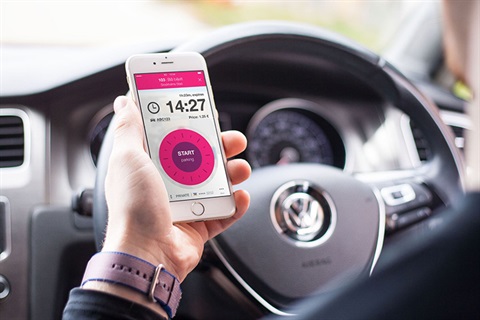
The City of Hobart provides you with a choice of payment methods for parking.
The easiest way is to use the mobile payment app EasyPark. You can also pay at the parking meter by credit or debit card, or coins.
To pay using either the app or at the meter, the correct bay number for the parking space is required. This is a unique code that appears as a three or four digit number displayed on the kerb.
More information on each payment method can be found in the tabs below.
EasyPark app
If you haven't installed the EasyPark app, you can find instructions at the bottom of the page.
Your bay number appears as a three or four digit number on the kerb next to your park in a metered space.

When parking in a voucher area, the area code appears on the signage and voucher machine in the area.
At the top of the app is an area for you to enter your 'Parking area code'. This is where you enter your bay number.

Any parking 'areas' will display on the map. Press the highlighted area and confirm with the area code number.
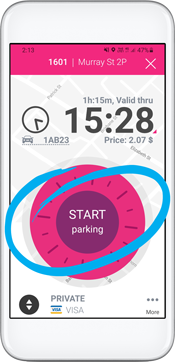
Spin the wheel to set your parking time, and then press 'START parking'.
Make sure you follow the time limits which are located on the relevant parking sign.
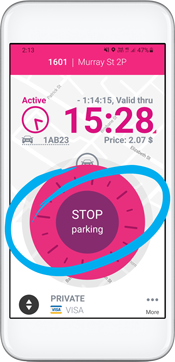
When you are leaving your parking bay, open the app and click 'STOP parking'.
This means you'll only pay for the exact time you were parked, and not for any longer.
Parking meters
Your bay number appears as a three or four digit number on the kerb next to your park.
Type in your bay number using the keypad on the machine.
Confirm your bay number by pressing the green tick  button.
Voucher machines
Take your voucher and display it on your vehicle's dashboard. Make sure it is easily visible.
Express pay
Express pay is now live in Argyle Street Car Park.
Drivers using express pay in the EasyPark app can now enjoy a simpler parking experience in Argyle Street Car Park.
Once express pay is enabled for your vehicle, your parking session starts automatically when you drive in and stops automatically when you leave. There is no need to take a ticket, use a payment machine or touch your phone.
Simply drive in, park and drive out.
To check, activate or deactivate express pay:
- open the EasyPark app
- go to Menu
- select Express pay.
For assistance, contact EasyPark Customer Support on 1300 734 070 or email customer.service@easypark.com.au.
Installing the EasyPark app
The EasyPark app is available to download for free from the Apple App Store for iPhones, or Google Play for Android phones.
With the EasyPark app, you can:
- skip the meter and pay from anywhere.
- top up your parking to the maximum time allowed if you're running late or held up
- get notified when your parking is due to expire
- end your parking session when leaving your space so you pay only for the amount of time you stay.
As the City of Hobart is operating from a bay-based system, map functionality is not required to use the app. Just insert the bay number to identify your location.
For more information on the app, call 1300 734 070 or visit the EasyPark website.
Public holidays
On-street parking restrictions do not apply on public holidays. This means you do not need to pay using the meter or EasyPark, and time limits do not apply.
Multi-storey car parks use the same fees as they do on a Sunday. These fees can viewed on the Argyle Street Car Park, Centrepoint Car Park and Hobart Central Car Park pages.
Please note: these arrangements apply to gazetted public holidays. This means that when a public holiday falls on a weekend, these arrangements are applied to the day the public holiday is recognised. For example, if New Years Day (January 1) falls on a Saturday, the public holiday will be recognised on the Monday (January 3).
Frequently asked questions
Answers to some frequently asked questions can be found on the parking FAQs page.